
Case study: Connectly - Mentorship that makes it onto the calendar.
Connectly is a mentorship app for two kinds of people: someone looking for guidance from a person who has already walked the road, and the mentor who wants to help without their inbox turning into a scheduling desk. Browsing, booking, and staying in touch all happen in one place.
Status: MVP in TestFlight
- Role
- Product design & full build
- Platform
- iOS & Android
- Audience
- Mentors & mentees
- Scheduling
- Mentors' own calendars
The intent
Matching people was never the hard part.
Almost every mentorship conversation dies in the same place. Two people agree they should talk, someone promises to send times, messages drift down the thread, a week goes by, and the momentum is gone. The introduction worked perfectly. Everything after it was left to good intentions.
Connectly was built to close that gap. The goal was to make the distance between “this person could help me” and a confirmed session as short as a few taps. No link swapping, no guessing at time zones, no waiting for a reply to know whether Tuesday works.
The second goal was to protect the mentor. Their time is the scarce thing in the whole system, so the app is built around their terms: they choose whether they offer video calls, chat sessions, or both, they set their own prices, and the only times a mentee ever sees are the ones they left open. Mentors say yes once, during setup, and the app handles the rest.
The product
From “who can help me?” to a booked session.
Five screens carry the whole experience. Each one exists to answer a single question and then get out of the way.
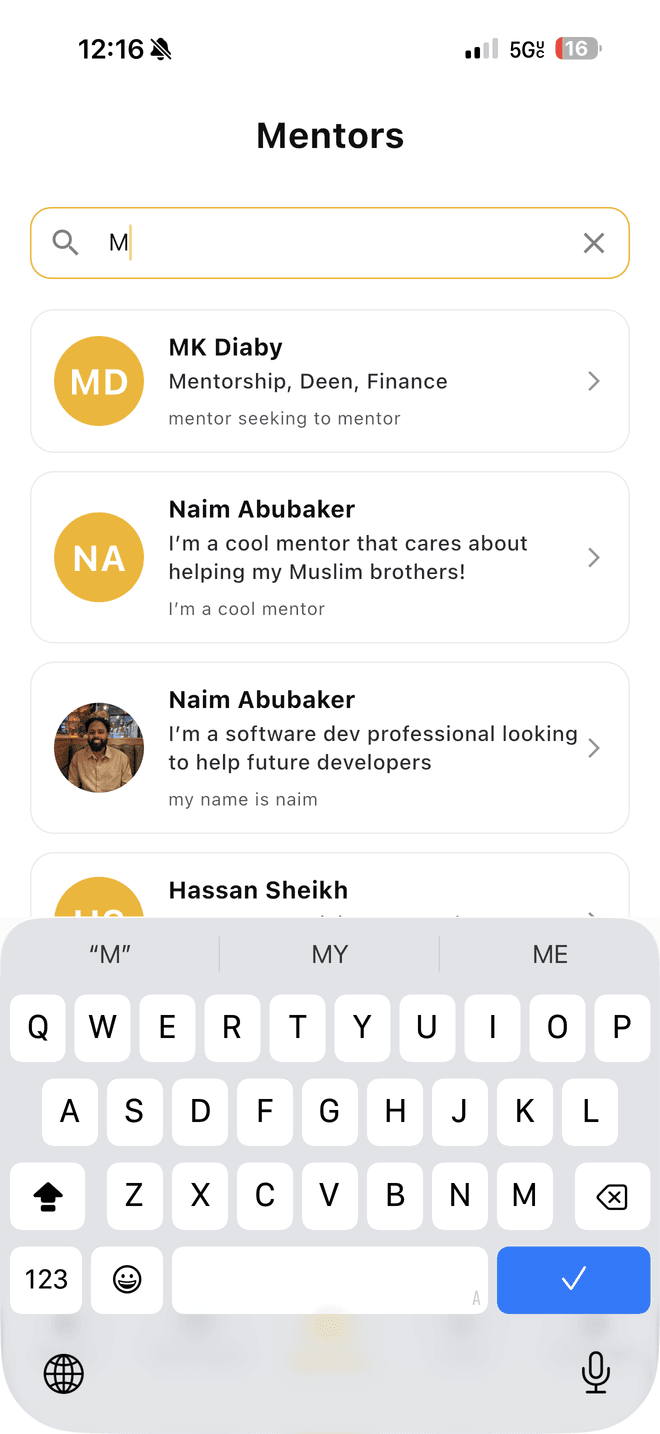
Find someone worth an hour
Every mentor leads with who they are and what they help with, so a mentee can judge fit before committing to anything.
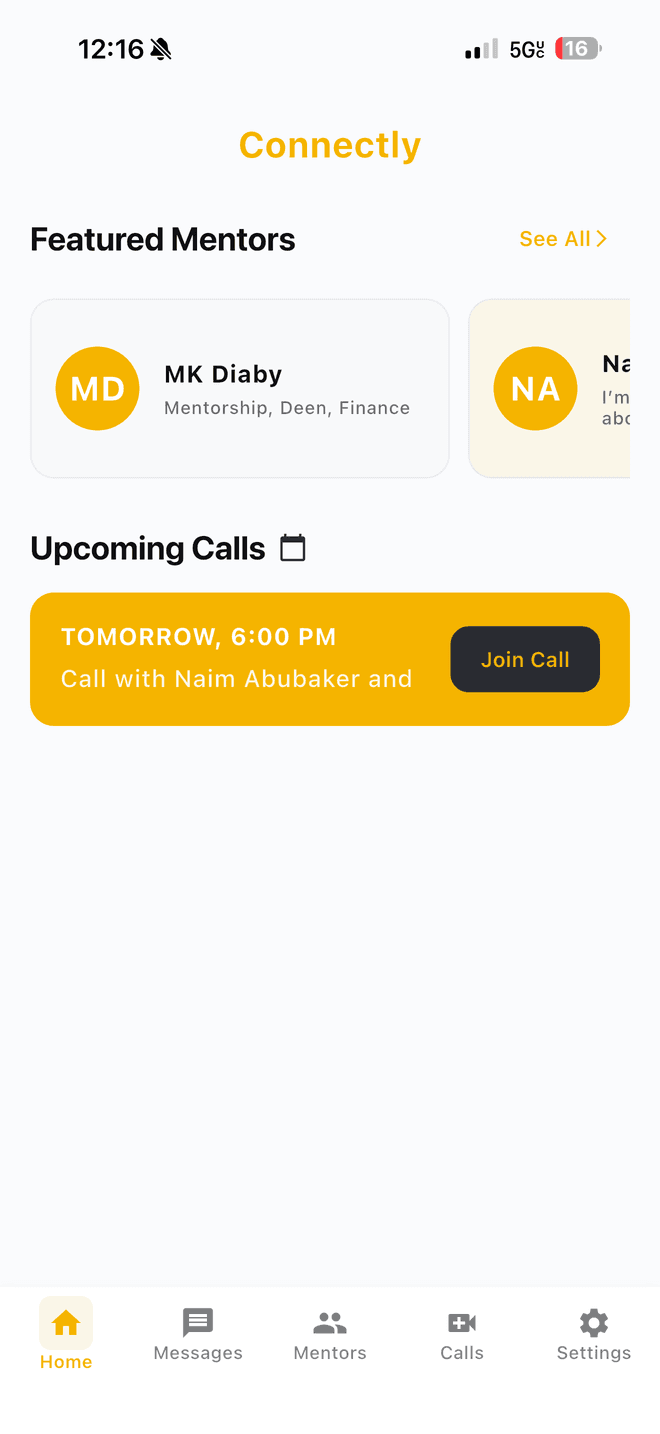
A home screen that answers “what's next?”
The upcoming call is the first thing you see, with the join button already on it. No hunting through email for a link.
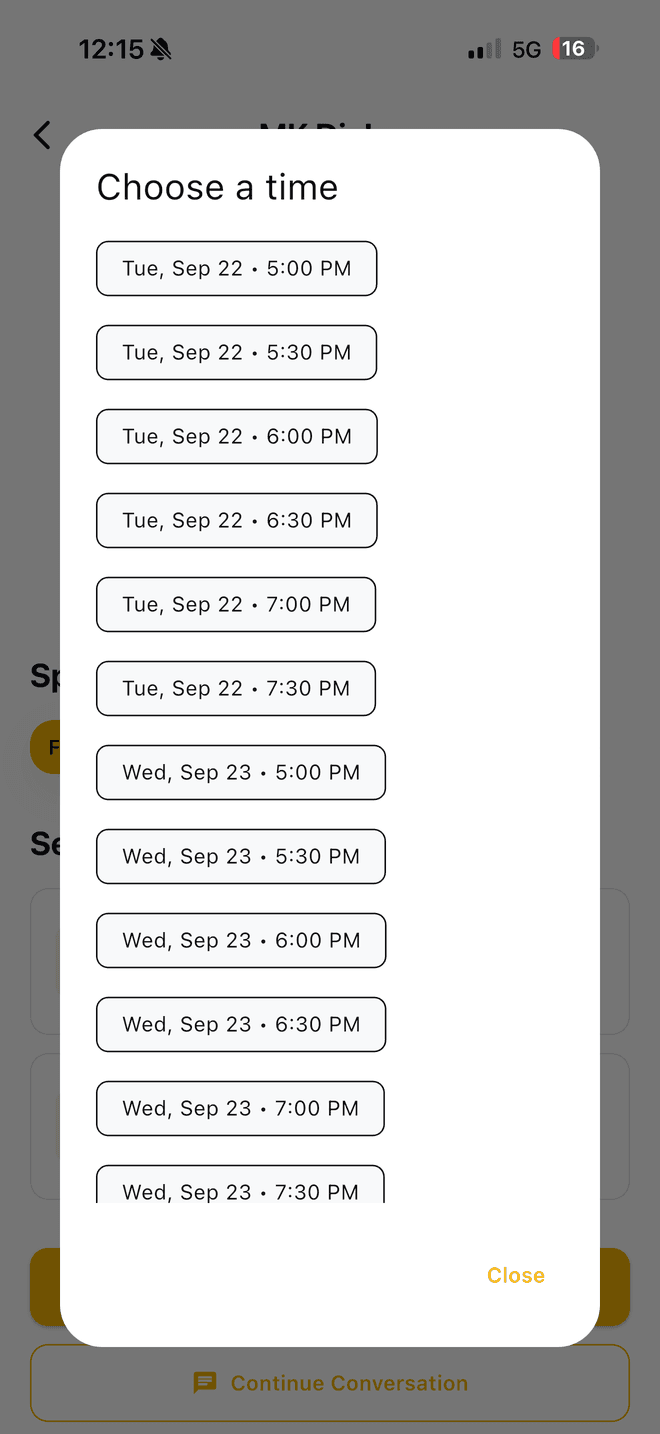
Pick a time that's actually free
No requests, no waiting for confirmation. If a time appears in the list, you can book it right then.
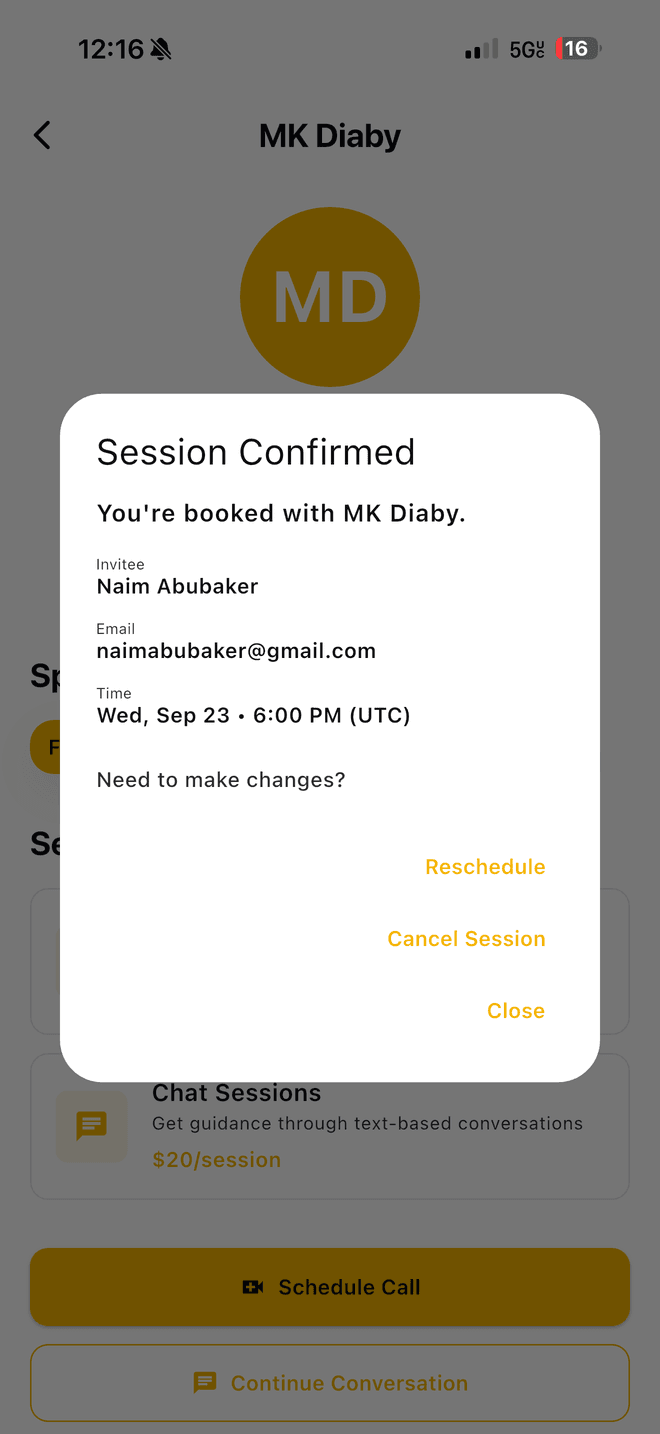
Confirmation without the guesswork
Rescheduling and cancelling sit right next to the booking, so changing plans never means chasing anyone down.
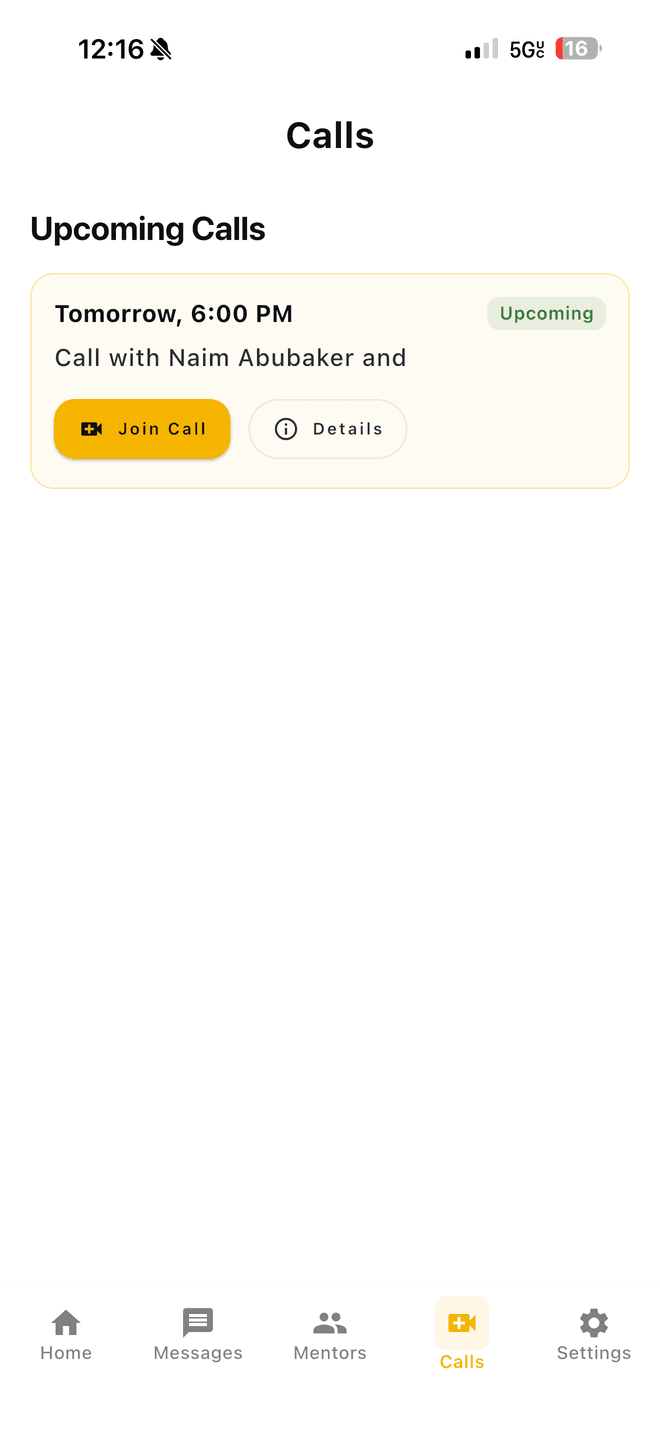
One tab for everything booked
Sessions stay current on their own. Cancel one anywhere else and it disappears here too.
And in between sessions
Not every question needs a video call. Mentors can offer chat sessions instead of calls or alongside them, so a quick question gets a quick answer and the relationship keeps going between meetings instead of starting over each time.
How it was built
Build the one thing that matters, then earn the rest.
Start narrow
The booking loop came first
Find a mentor, pick a time, get confirmed. We built that loop and made it feel good before letting anything else in. Every feature that came afterward, from messaging to profiles to pricing, had to justify itself against that core, which is why the app never grew a settings screen nobody asked for.
Two audiences, one app
Sign-up splits, the app doesn't
New members pick a side on their first screen and the setup forks from there: mentees describe what they're working toward, mentors describe what they know, what they offer, and what they charge. The app saves progress as they go, so nobody loses ten minutes of typing to a dropped connection, and neither side ever sees a control meant for the other.
Integrate, don't reinvent
No calendar was rebuilt here
Scheduling is a deceptively deep problem: time zones, double-bookings, buffers, cancellations. Instead of rebuilding all that badly, Connectly plugs into the calendar tool mentors already trust and wraps it in an experience that feels native to the app. That saved months of work and ruled out a whole category of bugs.
One look, everywhere
A shared design language, defined once
Colors, spacing, buttons, and avatars are all defined in a single place and reused across every screen. New features inherit the look automatically instead of drifting, and a brand tweak is one change, not a hundred. It's also why the app reads cleanly in both light and dark mode without a separate design pass.
Built once, runs twice
iPhone and Android from the same build
One codebase produces both apps, so a fix ships to everyone at once and the two platforms can't quietly drift apart. That decision kept the build affordable and keeps it cheap to maintain. The real cost of any app is the years after launch.
Guardrails
Safe to keep changing
Automated tests and checks run over the app on every change, covering the paths that matter most: signing in, finishing setup, and booking a session. The point isn't perfection; it's confidence that improving messaging on a Tuesday won't quietly break scheduling on a Wednesday.
Integrations
The pieces working quietly in the background.
A good integration is one nobody notices. Here's what Connectly leans on, and what each piece is responsible for.
- CalendlyScheduling
- ZoomVideo sessions
- StripePayments · Planned
Calendly
Real availability, real bookings
Mentors connect the calendar they already keep, once, through a secure sign-in, with no keys to copy or links to paste. From then on the app shows only times they're free, books the session on the mentee's behalf, and offers reschedule and cancel options on the confirmation. If a session changes anywhere else, Connectly hears about it and updates itself.
Zoom
The room the session happens in
Booking a session creates the video meeting automatically, and the link lands on the mentee's home screen behind a single Join Call button. Video links take a moment to be created, so the app waits for it instead of showing an empty button. If one ever fails to appear, the app flags the session so nobody is left staring at a dead link.
Secure sign-in
Getting in without friction
One tap with Google, or an email and password for everyone else. Password resets work properly, so nobody gets stuck at the door. Each person's role travels with their account, so mentors and mentees land in the version of the app built for them.
Live data sync
Everything current, everywhere
Profiles, messages, and bookings update the moment they change. A newly booked session shows up on the home screen and the calls tab without anyone pulling to refresh, and a conversation picks up on a second device exactly where it left off.
Photo hosting
Profiles people recognize
Mentors upload a headshot during setup; it's stored, resized for the app, and shown next to their name everywhere they appear. Anyone who hasn't added one yet gets a clean initials avatar instead of a broken image.
A private server layer
Where the sensitive work happens
The credentials that connect to a mentor's calendar never touch anyone's phone. A small, private backend holds them, does the talking, and hands the app back only what it needs: open times and confirmations. It also means the scheduling provider can be swapped later without shipping a new version of the app.
StripePlanned
Paid sessions and paid chats
Mentors already name their price during setup, one rate for a video session and another for chat, and mentees already see it before they book. Payments are designed for a later phase: paying for a session at the moment it's booked, paying for chat access the same way, and payouts landing in the mentor's account without anyone sending an invoice. The groundwork is deliberate: pricing, roles, and the private server layer were all built with this step in mind.
What the build proved
The fastest products to build are the ones that know what to leave out.
Solve the drop-off, not the feature list
Finding where people give up and designing that moment away did more for Connectly than any feature could have.
Borrow the hard parts
Connecting to mature tools for scheduling and accounts freed the entire budget to go toward the experience itself.
Decide who it's for, early
Designing for mentors and mentees from day one kept one audience from becoming an awkward afterthought.
Want to see it on your own phone?
Request a TestFlight inviteLet’s work together
Open to new projects and long-term partnerships.
Our offices
- U.S.A
Columbus, OH